A confirmation message does not always mean the enquiry reached the right person. Here’s how to audit the entire journey from the first form field to the inbox and CRM.
Why are we receiving fewer enquiries when traffic to the website is actually increasing? The short answer is that the problem does not necessarily lie with the traffic or the offer: the contact form may stop visitors, lose their information after they click or report the wrong number of conversions. A form may even display “Thank you, we’ll be in touch” despite the email having been rejected by the server, caught in a spam filter or never created. Server logs, delivery events, GA4 and Microsoft Clarity make it possible to trace the entire chain from the first keystroke to a lead being received and handled. Only by reviewing the technology, user behaviour and tracking separately can you identify which type of error is actually costing you business.

A successful test is not the same as a delivered enquiry
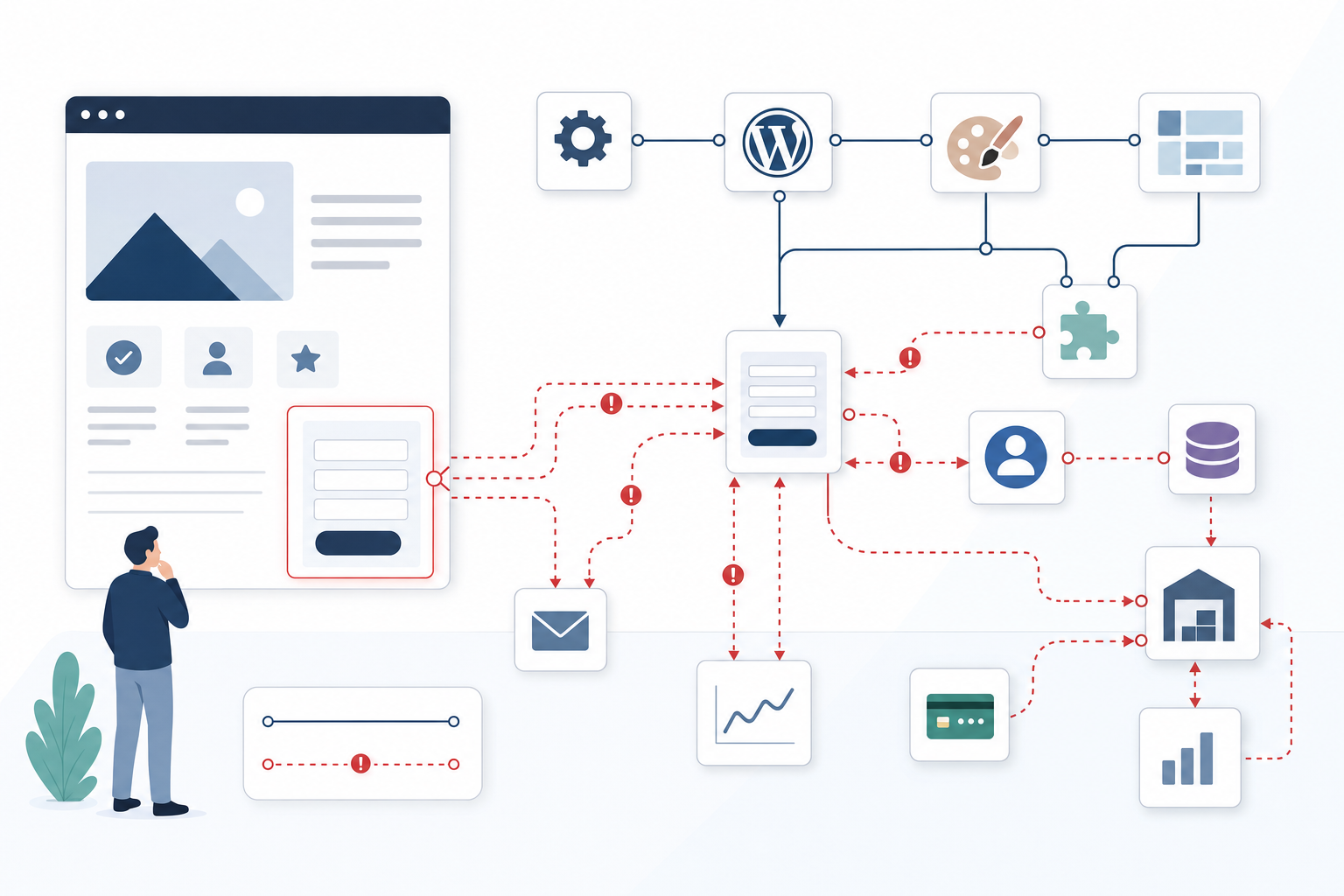
A test is not complete when the confirmation message appears. It is complete only when the same enquiry has been saved on the server, passed through any integrations and reached the correct inbox or CRM record. Give each test a unique reference, such as TEST-2026-001, and search for it in the form plugin’s log, the web server events, the email provider’s delivery history and the recipient’s actual inbox. This makes it possible to determine exactly where the message disappeared. The delivery log should distinguish between accepted, delivered, bounced and blocked, because the status “accepted” only means that the next server has received the email, not that a salesperson has seen it. A common delivery problem occurs when the form uses the visitor’s email address as the sender, which may violate that domain’s DMARC policy. Instead, send from a verified address on your own domain, configure SPF and DKIM correctly and place the visitor’s address in Reply-To. The most robust solution also saves the submission server-side or in the CRM before sending the email, allowing a temporary email failure to trigger an alert and a retry without losing the lead.
Hidden technical errors often appear only on certain phones and browsers
The fact that the form works in Chrome on an office computer says little about the experience in Safari on an older iPhone, Chrome on Android or the in-app browser of a social media platform. Start with the devices that actually appear in your website analytics and test at least Safari on iPhone, Chrome on Android and Chrome or Edge on desktop, both with marketing cookies accepted and rejected. In the browser’s Network panel, clicking submit should generate a POST request containing the expected data and receive the correct server response, because poorly implemented JavaScript can display a green confirmation message even when the server returns 400, 403 or 500. CAPTCHA, consent scripts and external validation libraries may also be blocked by content blockers or cookie settings, sometimes leaving the button visible and active while making submission impossible without a clear error message. Also test autofill, pasted phone numbers, long free-text responses, slow connections and double clicks, as a hidden space after an email address or a mobile network timeout can cause errors that never occur in the developer’s clean test environment.
Measure exactly which field causes potential customers to abandon the form
Page views and the total number of submissions cannot reveal whether visitors lack interest or become stuck on a required field, so measure at least form_start, validation_error, form_submit and form_success as separate events. When many users start the form but never reach form_submit, the friction often lies in the form’s length, the sensitivity of the questions or unclear error messages. By contrast, form_submit without form_success is far more likely to indicate a server error, blocked CAPTCHA or broken integration. Record the field’s technical name and the error type, such as phone_invalid or organisation_number_missing, but never send names, email addresses, phone numbers or free-text responses to GA4, Clarity or other analytics platforms. Microsoft Clarity can complement these events by revealing repeated clicks, mobile views where the keyboard covers the button and sessions where the user tries to correct the same field several times, provided that form fields are masked and recordings are handled in accordance with the company’s privacy requirements. If 38 per cent abandon the form at the budget field and the drop-off rate falls to 11 per cent when the field becomes optional, you have evidence of a UX problem rather than merely a generally low conversion rate.

Distinguish tracking errors from a genuine lack of enquiries
A reliable reconciliation compares three independent figures for the same period: successful submissions in the server log, received and unique leads in the CRM or inbox, and conversions recorded by the analytics tool. If the server log contains 42 successful submissions, the CRM has 40 new cases and GA4 shows only 19 conversions, the main problem is probably consent, ad blocking or incorrectly configured events, while the difference between 42 and 40 should be investigated in the integration or delivery process. If, on the other hand, the server log shows only 19 attempts despite a large number of form_start events, the problem occurs earlier in the journey, such as in the validation, CAPTCHA flow, mobile interface or the offer itself. Do not count form_submit as a conversion until the server has confirmed that the record has been saved, and pass a random submission_id to both the form log and the analytics tool so that duplicates can be identified without using personal data. The four combinations—few starts, many starts followed by abandonment, many submissions without success, or many server records without GA4 hits—produce four very different diagnoses: an offer problem, UX friction, a technical error or a tracking error.
Advanced troubleshooting: from a completed form to a received and accurately measured enquiry
A green confirmation message does not prove that the enquiry was delivered
The browser confirmation is only an interface state and may be triggered as soon as the information leaves the visitor’s device. To create a verifiable chain, the server should first validate the content, generate a unique case ID and save the record before responding with form_success. Separate logs must then show whether the CRM request was approved, whether the email provider accepted the message and whether the receiving server delivered or rejected it. An HTTP status 200 response therefore does not prove that a salesperson received the case, but it should at least mean that the enquiry has been saved in a recoverable way. Set up alerts for records that still lack a CRM status or delivery confirmation after a few minutes, rather than waiting for a customer to report that no one has responded.
Example: Before case IDs were introduced, the interface showed 20 successful test submissions, but only 14 emails were received. Once the same ID was logged throughout the entire chain, the six lost requests were traced to a CRM integration that timed out without the form displaying an error.
Mobile keyboards and browser autofill can cause errors that never appear on a developer’s computer
Mobile errors often arise from the combination of browser, operating system, keyboard and form validation rules. Autofill may add trailing spaces, a country code or a date format that the script does not expect, while an open keyboard can move the submit button outside the visible area. Testing services such as BrowserStack provide broad coverage, but they should be supplemented with at least one physical iPhone and Android device because virtual environments do not always reproduce keyboards, password managers or in-app browsers accurately. Also check that the correct keyboard type appears for phone numbers and email addresses, that the error message is positioned next to the field and that the user is automatically taken to the first error. Server-side validation should tolerate normal variations, such as hyphens and spaces in phone numbers, without accepting content that is genuinely invalid.
Example: A BrowserStack test showed that the form worked on desktop but could not be submitted in iOS Safari when autofill added a hidden space after the email address. Trimming the value before validation and displaying the error next to the field removed the blockage.
Measure the field where abandonment occurs—not just the page’s overall conversion rate
An overall completion rate tells you that something is happening, but not why. Track when the form is started, which field most recently received focus, which validation errors occurred and whether the user continued after the error. The analysis should be based on field names and error categories, not on the content entered by the person, and session recordings should mask all fields in which personal or company information may appear. Then examine patterns across audiences and devices: a budget field may create commercial hesitation on every device, while abandonment that occurs only in Safari is more likely to indicate a technical issue or visual placement problem. Make one change at a time and compare the same stage of the funnel; otherwise, you cannot determine whether the improvement came from removing a requirement, new traffic or a simultaneous campaign.
Example: When a required budget field was made optional, abandonment at that specific field fell from 38 to 11 per cent. Because form_start remained at the same level and no other fields were changed, the improvement could be attributed to the reduced friction.
Zero recorded conversions may indicate an analytics error, not zero enquiries
GA4 may miss events when visitors reject analytics cookies, use ad blockers or leave the page before the client-side request has time to be sent. The measurement may also be too high if an event is triggered by a button click, on every reload of a thank-you page, or both in the website code and Google Tag Manager. The server log should therefore serve as the operational source of truth for completed submissions, while the CRM shows how many unique cases were actually created and the analytics tool describes the measurable portion of the user journey. Compare submission_id where permitted and use daily or weekly totals for traffic that cannot be linked at an individual level. Once the discrepancy is known, reports can be labelled with their level of coverage so that management does not interpret 19 measured conversions as 19 actual leads when the server has recorded 42.
Example: GA4 reported 43 form conversions, while the CRM contained only 31 cases. The event was triggered when the submit button was clicked and therefore also counted validation errors, rejected CAPTCHA attempts and repeated clicks before an approved server response had been received.

Questions that reveal where enquiries disappear
When did we last test the entire process by submitting a real enquiry?
Perform the test after every major change to the form, plugin, CRM or email configuration, as well as regularly according to a defined schedule. Submit a clearly labelled test enquiry from both mobile and desktop, check the browser confirmation and follow the same reference through the server log, delivery service, inbox and CRM. Also verify that any automatic response reaches the sender and contains the correct sender information, contact details and expected response time. If the process only checks the inbox, you will miss both enquiries that were never saved and cases that exist in the system but were routed to the wrong person.
How many people start completing the form but never submit it?
Calculate the percentage that moves from a form view to form_start, then to form_submit and finally to form_success, and break down abandonment by device and the last field involved. Many page views but few starts often indicate an unclear offer, low trust or a button that is not perceived as relevant. Many starts followed by validation errors instead show that the form’s requirements or feedback are creating friction. Clarity sessions can add context to the figures by showing whether users click repeatedly, scroll in search of a hidden error or leave when a sensitive field appears.
Does the form work on the phones and browsers our visitors actually use?
Prioritise testing according to the actual traffic distribution rather than the devices that happen to be available in the office. Pay particular attention to iPhone with Safari, Android with Chrome and the most common desktop browsers, but also include in-app browsers if a large amount of traffic comes from LinkedIn, Facebook or Instagram. Test every relevant combination with cookies accepted and rejected, as well as with a common content blocker. Testing should include autofill, screen rotation, zoom, a weak connection and keyboard behaviour, because a hidden button or incorrect validation can make the form virtually unusable even though the page still loads.
Do submitted enquiries reach the right person and receive timely follow-up?
A technically delivered enquiry creates no business value if it lands in spam, is forwarded to a former employee or remains unattended in a shared inbox. Check routing rules, distribution lists, spam quarantine and CRM connections, and ensure that every new case has an owner and a clear deadline for first contact. Track separately when the case was created, when it was assigned and when the customer received a response. This makes it possible to distinguish a delivery problem from an internal follow-up problem, even though both feel the same to the potential customer.
Can we distinguish a broken form from an offer that fails to persuade?
Yes, provided that every stage is measured and technical errors are investigated before you change the message. A low number of form_start events relative to relevant page visits is more likely to indicate that the offer, trust signals or path to the form need improvement. Many starts but few submissions, especially when accompanied by validation_error events or recurring problems in Clarity, point to UX friction. By contrast, form_submit without form_success indicates a likely technical error, while many server records but few analytics conversions reveal inadequate tracking. Only once the entire chain is working should you A/B test headlines, proof points, offers and calls to action.
Start with a documented test that follows the journey from the visitor’s click to an enquiry being received and handled, and give every stage measurable evidence instead of relying on the confirmation message. When technology, user behaviour, delivery and analytics are reconciled separately, you can determine whether the next step should be a technical fix, a simpler form or a clearer offer.