Headless WordPress can offer considerable technical freedom, but it is far from suitable for every business. Here are practical criteria for choosing between traditional WordPress and a headless solution with Next.js.
You run a growing industrial company, and the marketing team needs to update an offer on a campaign page before the weekend. The text is changed in WordPress, but it must then be checked in a preview environment and reach the Next.js frontend before anyone can be certain that the correct version is being displayed.
If a simple text change has to pass through WordPress, a preview and a new deployment or cache invalidation, the company has not automatically gained a faster website—it has added three new failure points to its publishing workflow. Headless WordPress means that WordPress manages the content while, for example, Next.js builds the website visitors see. In 2026, the technology is mature enough for stable solutions, but maturity does not make the architecture cost-effective for every project. The crucial question is which specific requirements justify the additional cost compared with a well-built traditional or hybrid WordPress solution.

Editors Often Lose More Than Developers Gain
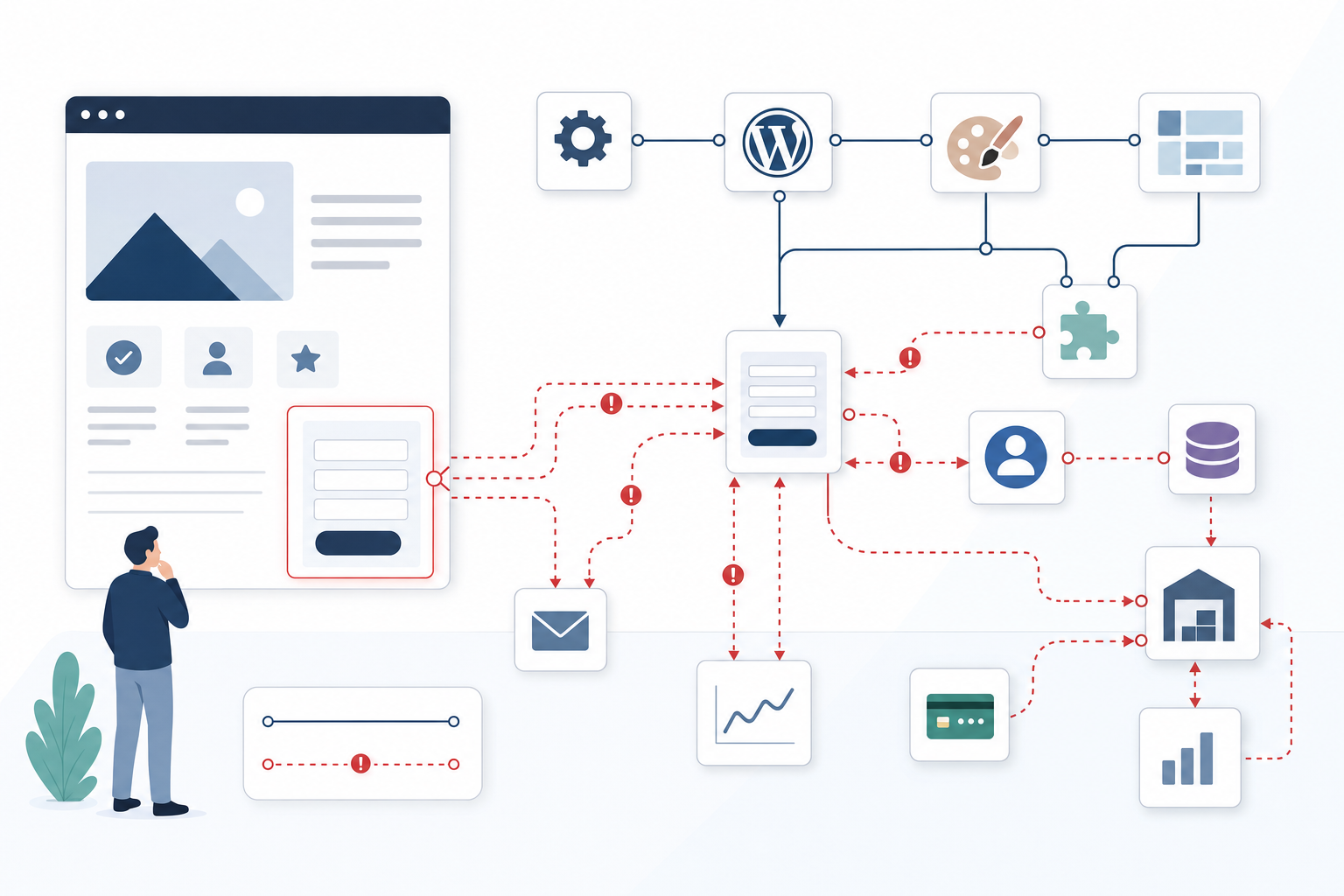
In traditional WordPress, editors can build a page in Gutenberg, preview it in the website’s theme and publish it without leaving the same system. When the presentation layer is moved to Next.js, that connection is broken because the content must first be retrieved through the REST API or WPGraphQL and then interpreted by separately developed components.
A reliable preview requires unpublished content to be retrieved securely, Next.js Draft Mode to be activated for the correct user and the components to display the same result as the public frontend. Scheduled publishing also becomes a shared responsibility: WordPress may publish the article at 8:00 a.m., but if the frontend is still serving an older cached version, the change will not appear until the correct page has been invalidated or rebuilt.
The cost becomes particularly apparent when the marketing team creates flexible campaign pages using Gutenberg blocks, form plugins and reusable layouts, because every relevant block must then be modelled and rendered again in Next.js. Headless is much better suited to content that follows stable models such as products, articles, employees or offices, where the presentation changes less frequently.
Integrating WordPress Plugins Can Require Expensive Custom Development
Many WordPress plugins are inexpensive because they combine data storage, an administration interface and ready-made functionality in the theme. When Next.js takes over the presentation layer, often only the data remains, while the user interface and much of the behaviour must be recreated.
A form built with Contact Form 7 or Gravity Forms then requires a React component, API calls, validation in both the browser and the server, clear error messages, spam filtering and integration with the company’s consent solution. A form that was previously embedded using a shortcode therefore becomes an integration that must be tested after changes to the plugin, API and frontend application.
For WooCommerce, the integration surface is even larger because the shopping cart, sessions, login, discount codes, payments and current stock levels must work across the boundary between WordPress and Next.js. Search and membership features similarly require decisions about indexing, permissions, authentication and where the user session should reside. SEO plugins may store metadata, but they cannot force Next.js to render canonical tags, Open Graph data, robots directives, structured data and correct sitemaps; all of this must be explicitly included in the implementation.

Next.js Does Not Automatically Fix the Performance Problems That Actually Matter
A statically generated Next.js page can be served quickly from a CDN or edge cache and handle major traffic spikes without WordPress having to process every page view. For a content website updated a few times per day, however, full-page caching, optimised hosting and a CDN in standard WordPress can deliver similar cache hit rates with significantly fewer moving parts.
Headless delivers greater business value when the same content must be used across several channels, when campaigns generate extremely large and predictable traffic spikes or when the website needs an app-like experience that would be difficult to build and maintain in a WordPress theme. However, it is not a remedy for an uncompressed hero image, a resource-heavy video player or five marketing scripts that block the main thread.
If Largest Contentful Paint is caused by image size and Interaction to Next Paint is impaired by analytics tools, chat and consent management, those problems will follow you to Next.js. A fair comparison must therefore use real landing pages with the same images, fonts, tags and personalisation—not compare an old production website with a stripped-down Next.js demo.
Headless Requires a Budget for Two Applications, Not Just a New Frontend
The cost of headless does not consist solely of the initial Next.js development. It also includes the long-term management of two interconnected applications. The team needs to manage WordPress and PHP, Next.js and Node.js, API contracts, the build pipeline, cache invalidation, monitoring and usually two separate hosting environments.
Because the systems each have their own release pipeline, an error can occur in the content model, API query, component, preview functionality or cache, and troubleshooting requires someone who understands the entire chain. Even small changes have a wider impact: a new content field may need to be added in WordPress, exposed through the API, typed in TypeScript, rendered in Next.js and regression-tested across several publishing modes.
Small business websites with standard forms, a few landing pages and moderate traffic rarely recoup this additional cost, while multiple frontend channels, a shared content platform, extreme traffic spikes or advanced interactivity can generate a measurable return. The desire for better Core Web Vitals is not normally sufficient on its own, particularly if an optimised WordPress solution or hybrid approach can achieve the same objective with less risk.
Four Costs That Are Often Underestimated in a Headless WordPress Project
The Editorial Team’s Lost Preview Becomes a Permanent Productivity Cost
In traditional WordPress, editors can often build, preview and publish in the same place, while headless requires blocks, previews and publishing statuses to work consistently across two systems. When the preview differs from the actual frontend, the editorial team begins compensating with manual checks, screenshots, test publications and post-launch corrections. A few extra minutes per page may appear negligible in the project budget, but they become a recurring cost throughout the website’s entire lifespan.
Example: After switching to Next.js, quality assurance for a campaign page increased from approximately 15 to 45 minutes because the Gutenberg preview did not match the final frontend rendering.
An Installed Plugin Is Not the Same as a Working Headless Integration
Plugins for forms, search, membership and personalisation often assume that WordPress both displays the interface and manages the user session. In a decoupled solution, these functions must instead be connected using APIs, webhooks and custom frontend logic, while error handling, security and accessibility also need to be tested. A standard feature with a low licence cost can therefore become custom development that must be revisited every time the plugin’s or frontend’s interface changes.
Example: A Gravity Forms form that previously took one hour to set up required a custom React component, API endpoint, spam handling and error reporting in Sentry after the migration.
Next.js Does Not Hide Slow Data Sources or a Heavy Frontend
Changing frameworks does not solve the underlying problem if the page is burdened by large images, complex GraphQL queries, inefficient caching logic or numerous external scripts. Statically generated demo pages can easily create a misleading impression when production pages are later supplemented with video, advertising, consent tools, personalisation and multiple analytics pixels. The performance budget must therefore cover all page content and third-party code, not only the time required to deliver HTML from the server.
Example: A home page scored 95 in Lighthouse without external scripts but dropped to 58 when GTM, Cookiebot, chat and three marketing pixels were activated.
Headless Means Two Release Pipelines, Two Failure Modes and an Integration Layer
The maintenance budget must cover WordPress, the frontend application and the contract between them, including hosting, logging, monitoring, security updates and testing. The less visible cost arises when the business wants to change its content and a seemingly simple module affects the data model, API query, type definition, component, preview and caching logic. The company also needs access to expertise in both technology stacks to avoid becoming dependent on a single developer or supplier during incidents.
Example: A new customer case module went from half a day of WordPress work to three days of work involving ACF, WPGraphQL, TypeScript types, a Next.js component and regression testing.

Questions That Reveal Whether Headless Is Really Necessary
What Specific Business Problem Does Next.js Solve That Standard WordPress Cannot?
If the answer is mainly that the solution feels modern or could be faster, there is often no sufficiently strong business case. The requirement should be linked to a measurable outcome, such as the same content needing to power a website, app and in-store displays, advanced personalisation increasing conversions or traffic spikes affecting sales. Define the problem and its financial impact before choosing the technology.
Does Our Marketing Team Need to Build and Publish Pages Without Developer Assistance?
If the editorial team frequently creates new layouts, a visual and predictable Gutenberg workflow is a business function, not merely a convenience. Every landing page that requires a new Next.js component increases lead time and shifts the cost from the marketing team’s work to the development queue. Ask the supplier to demonstrate the entire workflow, from draft and preview to scheduled publishing, using a realistic campaign page.
Do We Have the Budget and Expertise to Manage Two Interconnected Systems?
Headless normally involves a separate frontend, WordPress backend, APIs, hosting, build processes and monitoring. The organisation needs a clearly designated technical owner, an ongoing development budget and a plan for who will respond when publishing, an integration or a deployment fails. Without these, the solution becomes vulnerable and supplier dependency will be greater than the original quote suggests.
How Many of Our Most Important WordPress Features Must Be Rebuilt for Next.js?
Map out forms, search, member login, multilingual support, previews, SEO, e-commerce and other business-critical features before making a decision. For each feature, the cost estimate should show what the plugin will continue to handle, what needs to be developed in React and who will be responsible for the integration during future updates. A long list of customisations is a clear sign that the architecture may create more complexity than business value.
Are Our Performance Problems Really Caused by the WordPress Architecture?
Slow hosting, large images, unnecessary plugins, poor database queries and inadequate caching can often be addressed without changing platforms. Start with measurements that show what is impairing loading speed and interactivity, optimise a representative WordPress page and then compare the cost with an equivalent Next.js version. If traditional or hybrid WordPress achieves the organisation’s objectives, a fully headless solution is probably overengineered.
The right decision is rarely between old and modern, but between necessary and unnecessary complexity. Start with the business requirements and consider testing a hybrid approach in which Next.js is used only for the parts that genuinely justify the investment.